
AI Imaging Portal
Background
This company had developed proprietary software that presents processed images of devices to live agents that require evaluation in real time. Agents would review the images captured and were responsible for grading their condition.
However, this evaluation process was turned on its head with a new machine learning program that lives over the existing software and is able to automate device examination while also grading more quickly and accurately than live agents based off learning from extensive test data sets from thousands of device images.
The new AI was not yet ready to be fully released into the field and needed to continue collecting test data. Which meant it would need to be integrated in the same environment as live agents to collect data and complete requests.
Problem
- Make design updates to company’s internal web portal to accommodate machine learning of “virtual agent’.
- Ensure that live identity verification agents experienced overall ease of use while acclimating to the newly hybrid manual/AI evaluation program.
My Role
UI Design
User Research
Platforms
DESKTOP SOFTWARE
User Research
Before releasing the software, research with the product’s primary, verification agents was conducted to validate whether the proposed user interface changes are intuitive and easily understood by agents. The main objectives of the study included:
Validate new design concepts for PGV portal, with emphasis on testing usability of new features for device verification.
Evaluate how agents’ performance is affected by design changes.
Gain a better understanding of how agents work in current portal design to help inform new user interface.
Verify if proposed UI design allows agents to perform all functions needed to effectively evaluate a device’s LCD and mechanical attributes.
Background
ecoATM’s phone grade verification (PGV) portal is an internal tool used by PGV agents to verify the condition of a device. The current tool works by presenting images of a device being evaluated in real time to agents for their review. These images are captured by the kiosk where the device is being evaluated.
Currently, kiosks only return device preprocessing images suited for mechanical evaluation of devices. Soon users will be asked to turn on their phone cameras before evaluation to facilitate kiosks to capture a new set of device images which will enable PGV agents to also review the LCD. To accommodate this new grading feature, the PGV portal requires a redesign of the user interface.
Methodology
The recommended methods to conduct this study is through a multi-part approach that includes unmoderated observation, concept testing, and interviews.
Through unmoderated observation, UX team will observe users interacting with the existing product to understand how they utilize and navigate the portal to complete their tasks. Through actively observing the agents at work, pain-points within the current portal will be uncovered and may inform new user interface design.
Using concept testing, researcher(s) on the UX team will share a prototype of the PGV portal that captures the key essence of the new design concept to determine if it meets the needs of the target audience, which in this case are PGV agents.
One-on-one interviews will be held before and after the concept test to discuss in depth what the participant thinks about the product in question.
To facilitate this, it is suggested that this study be conducted in the Transaction Services department at ecoATM’s headquarters so UX team can easily observe agents in their actual work environment, using the equipment the agents already know and are comfortable with.
Participants
3-5 test participants comprised of active PGV agents recruited internally from ecoATM/Gazelle’s Transaction Services department.
Location & Dates
June 2021
Equipment
(1) Nest Camera
-
To capture discussions between participant and researcher, and record how agents navigate the current PGV portal and prototype interface.
(1) Laptop
-
To log observations; including usability problems and metrics such as completion rate and approximate time on scenario task.
Procedure
Part I: Introduction (5 minutes) Part II: Observation (10 minutes) Part III: Pre-Test Questions (5 minutes) Part IV: Interaction Tasks (15 minutes) Part V: Post-Test Questions (5 minutes)
Total Session: 40 Minutes
Part I: Introduction (5 minutes)
Thanks for being here, my name is , and I’m going to be walking you through this session.
If you have questions along the way, just ask. I may not be able to answer them right away since I’m interested in seeing what agents like you will do when you don’t have someone sitting next to you, but I will try to answer any questions you still have once we’re done.
You may have noticed I have a Nest cam here. With your permission, I would like to record this session to help me later on remember what we discussed. Please be assured that anything recorded will be kept confidential and used internally by the UX team for research purposes only.
Do you have any questions before we begin?
Part II: Observation (10 minutes)
For this first part I would like to spend a few minutes to see how you review transactions in the portal, so please go about your work as you normally would as if I wasn’t here. This will help give me a better understanding of the PGV portal and how you work within it.
Part III: Pre-Test Questions (5 minutes)
Before we move to what’s next, I’d like to ask you just a few quick questions:
-
First, what’s your position here?
-
How long have you been in your current position?
-
-
In your own words, how do you use the portal to do your work?
-
What portal features do you use most frequently?
-
What, if anything, about the portal prevents you from doing your work more easily?
-
Are there any tools you use that help you do your work in the portal?
-
-
When reviewing a device, what do you look for to make a mechanical evaluation?
-
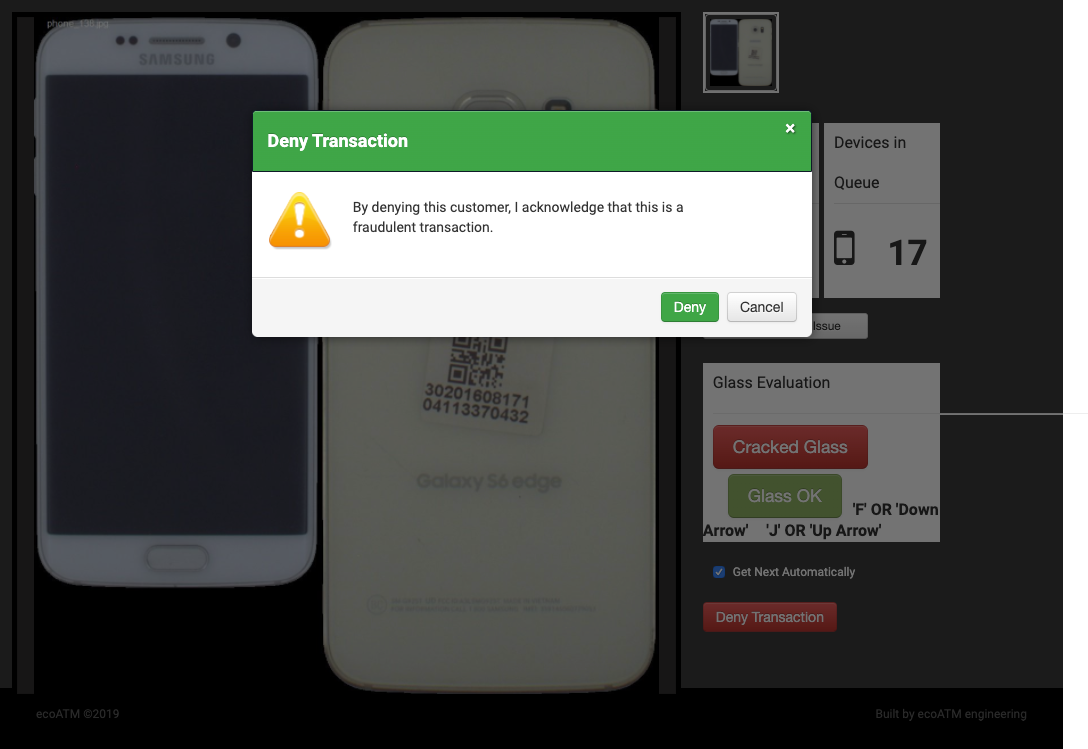
Under what circumstances would you deny a customer and report a transaction as fraudulent?
-
How would you deny the transaction?
-
-
Under what circumstances would you report a camera issue with the kiosk?
-
What would you do to report it?
-
Part IV: Interaction Tasks (15 minutes)
The UX team is evaluating a design for the portal and are interested in seeing what it would be like for you to use it, to learn how it might be improved.
Please keep in mind that we’re testing the design, not you. There are no right or wrong answers, I just want your honest opinion. I want to hear exactly what you think, so please don’t worry that you’re going to hurt my feelings.
Okay, now I’m going to give you a few scenarios and ask you to try and go through them using this prototype.
As we go along, I’m going to ask you to think out loud, and tell me what’s going through your mind so I can better understand your experience and what you’re thinking each step of the way.
Scenario 1: Show me how you would evaluate these devices.
Tasks:
-
Approve the LCD and Mechanical for the device in queue.
-
Deny the LCD and Mechanical for the device in queue.
-
Evaluate the LCD for a customer who did not turn on their phone’s camera.
Scenario 2: What would you do if no images were appearing during evaluation?
Tasks:
-
Report an issue with the kiosk camera.
Scenario 3: How would you grade a device that came in and was clearly a counterfeit?
Tasks:
-
Deny a customer transaction for fraudulence.
Scenario 4: If you needed to find out what kiosk this device was at, how would you do that?
Tasks:
-
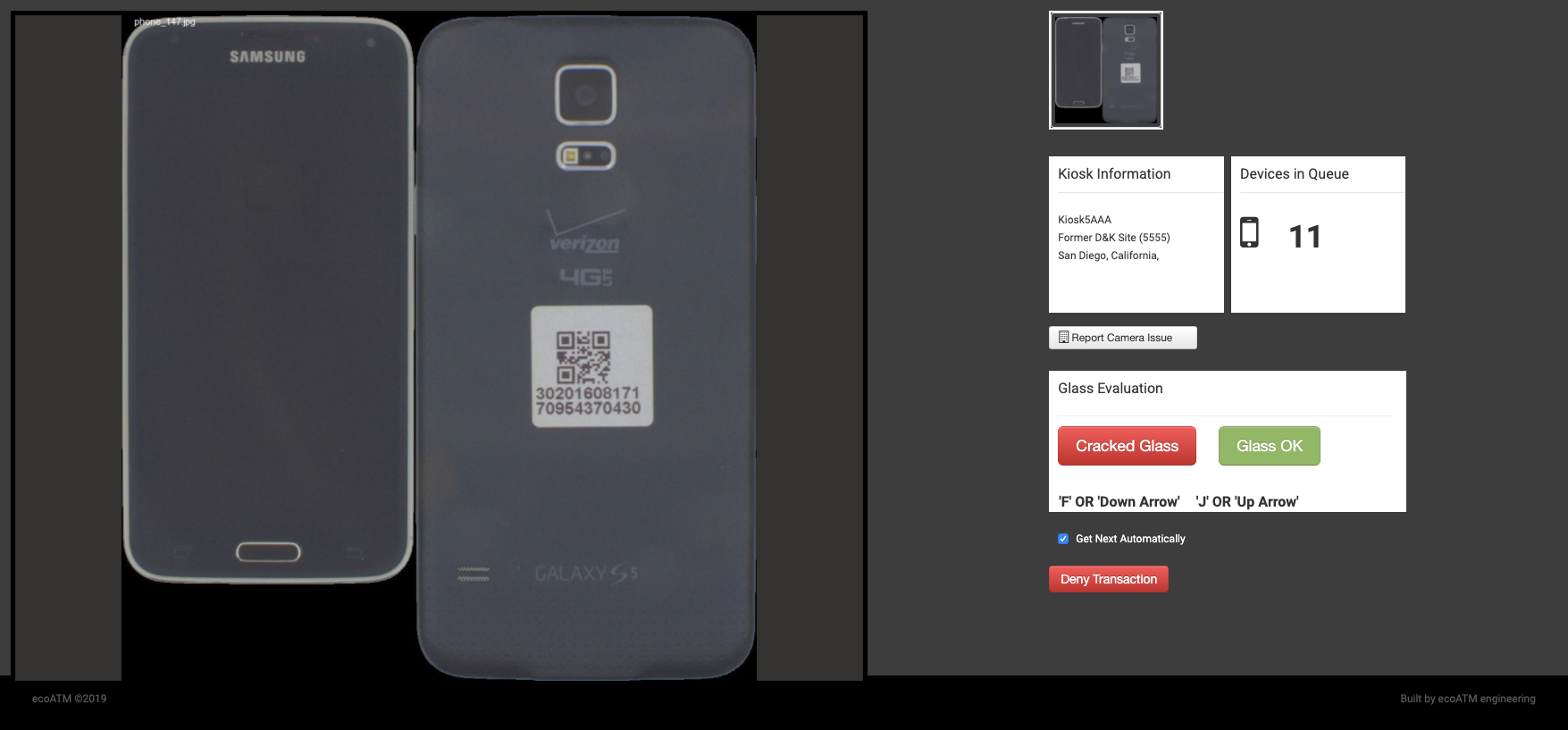
Locate kiosk information; including number and address.
Scenario 5: You want to see how many more devices still need to be evaluated, how would you do that?
Tasks:
-
Locate number of devices in queue for evaluation.
Scenario 6: What would you do if you needed to take a break and couldn’t evaluate devices that need verification?
Tasks:
-
Find and operate the device in queue feature that determines whether or not the device that is next in queue automatically show up next.
Scenario 7: If your mouse was broken, would you be able to evaluate this device?
Tasks:
-
Verify if agent uses keyboard shortcuts for approve, deny.
-
Determine which shortcut options agents prefer using.
Part V: Post-Test Questions (5 minutes)
-
What did you like about the portal design?
-
What didn’t you like about the portal design?
-
Was there anything you thought was confusing or difficult to do?
-
Was there anything missing in the portal design?
Overview
A research and usability study was conducted at ecoATM’s Transaction Services department to observe how PGV agents utilize the existing PGV portal, and validate new design concepts for it, including testing the usability of a new feature for LCD verification.
Participant
Christian Aguirre, PGV Agent
Note: Due to the quarantine requiring that PGV agents work remotely, only one agent was able to participate as he had been given previous clearance to work on site.
Pre-Test Question Results
1. How long have you been in your current position as PGV Agent? 7 months
2. In your own words, how do you use the portal to do your work? Spends majority of his time in portal within top right panel where selection of whether mechanical attributes of device pass or fail.
3. What portal features do you use most frequently? Uses controls often to manage brightness and zoom in/out.
4. What, if anything, about the portal prevents you from doing your work more easily? Christian said nothing about the portal itself prevents him from doing his work, but rather, other variables that connect to the work he does; such as when kiosk cameras are not functioning or if customers misplace their phone in a kiosk.
5. Are there any tools you use that help you do your work in the portal? Uses the built in manual controls for light/dark and zoom in/out often.
6. When reviewing a device, what details do you look for to make a mechanical evaluation?
- Cracks on edges
- When people still have screen protector on as this will take more time to examine
- Dead pixels as they sometime create uncertainty whether it is just a speck of dirt or not. wonders if dirt or not.
7. Under what circumstances would you deny a customer and report the transaction as fraudulent
- If there is string being used à la “string bandit”
- If a user tried to sell non-accepted devices such as e-cigarettes, apple watches, airpods, etc.
- No QR code sticker on the back of device
- Institution owned devices; often say “property of…” on wallpaper image. Pays special attention to tablets now that schools are providing them to students during quarantine.
- Phones that are visibly stolen, say “lost phone” on screen
- iCloud lock is still on; can tell easily if screen to ‘login account’ is open
8. Under what circumstances would you report a camera issue with the kiosk?
- If there was only one acceptable device image being returned
- Black slash running through other device image
Interaction Tasks
Post-Test Question Results
What did you like about the portal design?
Separate LCD Grading: Appreciates the fact that LCD quality is now evaluated on a new, different screen. Christian says that he already does LCD grading to an extent in the current portal, combined in the mechanical evaluation screen. So having LCD verification as a separate effort allows “more focus” dedicated just to evaluating LCD.
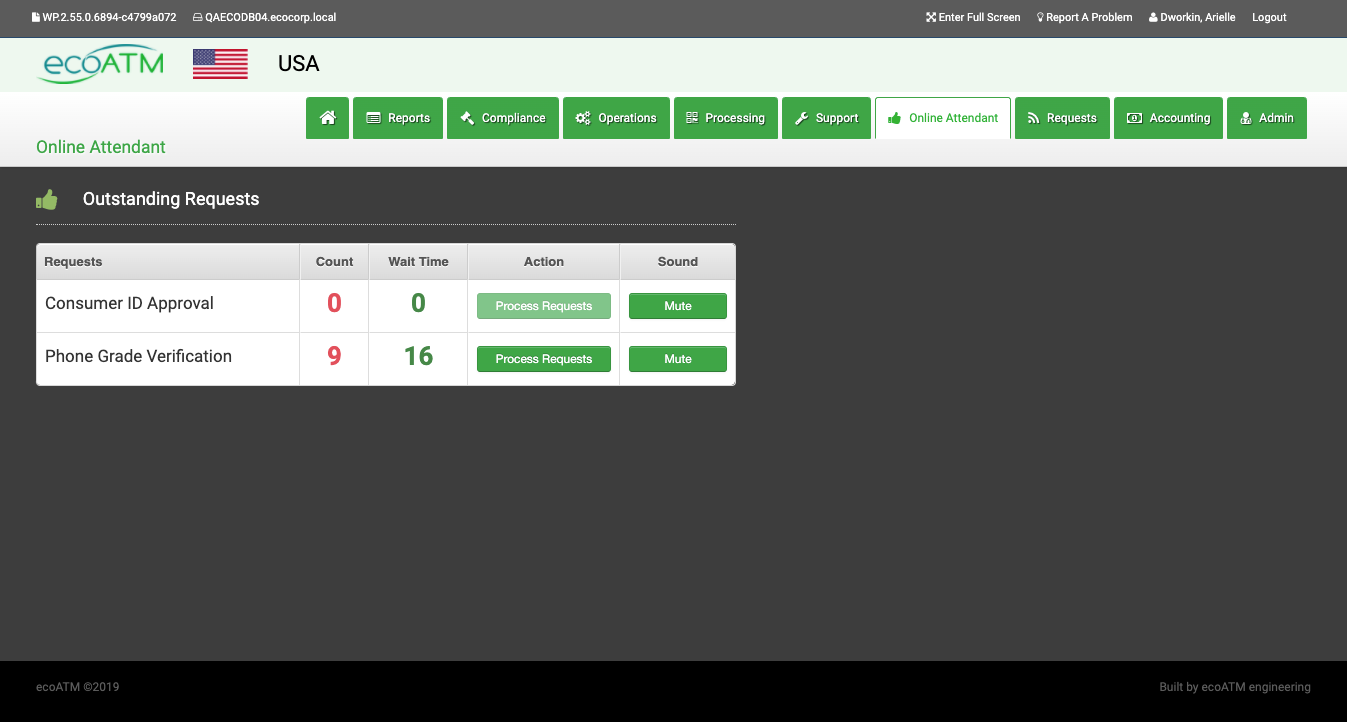
Device Queue: Likes the inclusion of ‘Outstanding Requests’ feature in top left utility area that now allows him to quickly see how many devices still require verification.
2. What didn’t you like about the portal design?
Format: Christian thought the YES/NO format used in prototype to process mechanical and LCD was confusing. He said he wasn’t confident he was making the correct decision when grading as it wasn’t clear to him whether he was answering YES/NO the descriptive question or the condition of the device itself.
Descriptive Question Language: Christian felt the question format of the description that was intended to provide guidance on what he should be looking for to evaluate LCD and Mechanical didn’t clearly connect to the YES/NO decision, especially in the case of the LCD language: “Do all parts of the screen light up correctly? Check if screen has flaws or is dim”. Due to the fact the descriptive question was two-part, he wasn’t sure which he should answer first, and in what order.
3. Was there anything you thought was confusing or difficult to do? Again, just the question format of the descriptions.
4. Was there anything missing in the portal design? Christian: “Everything looks pretty good.”
Key Findings
The language and corresponding YES/NO module in grading selection area is not easily understood and adopted by users.
Recommendation(s): Rewrite descriptive language so it is no longer in question format. This way, there is no ambiguity that the YES/NO answer is only in relation to device images, and not the question being asked.
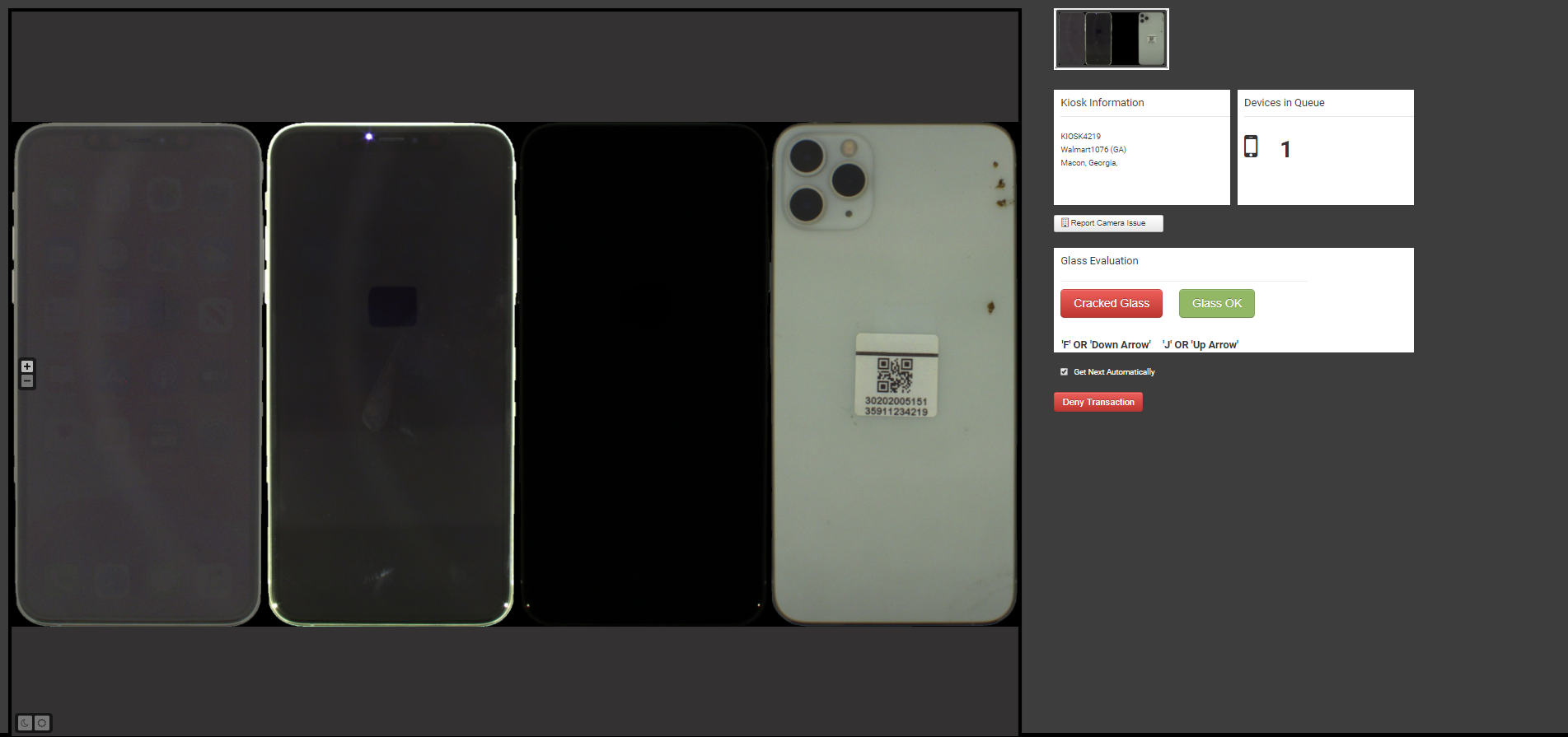
When agent has no devices left in their queue, they are returned to Outstanding Requests dashboard, where they have to frenetically click ‘Process Requests’ in a “race” against other agents to get the next device that needs phone grade verification.
Recommendation(s): If agent has ‘Get Next Automatically’ checked off in Queue Status panel, do not return them to Outstanding Requests dashboard when there are no longer devices in queue. Instead, take them to a waiting or blank screen and automate next device in queue to be automatically and evenly distributed to next available agent. This way, agents will not waste unnecessary energy on clicking ‘Process Requests’ button.
Agents rely on and use frequently the manual controls for light/dark and zoom in/out.
Recommendation(s): Explore improvements to light and zoom controls that will increase efficiency of tools and help to minimize time spent operating controls. One such idea is to replace zoom control with a magnifying feature so that the part of the device agents want a closeup of is pinpointed when hovering.
Agents rely on and use frequently both the keyboard shortcuts and mouse to make a good/bad evaluation. The choice to use shortcuts or keyboard vary by simple preference, or is related to his/her physical position when using hardware.
Recommendation(s): Research widely used keyboard shortcut conventions e.g.; WASD, and implement new keyboard shortcuts that allow for increase in efficiency and are more ergonomically sound.
Solution
Before
After
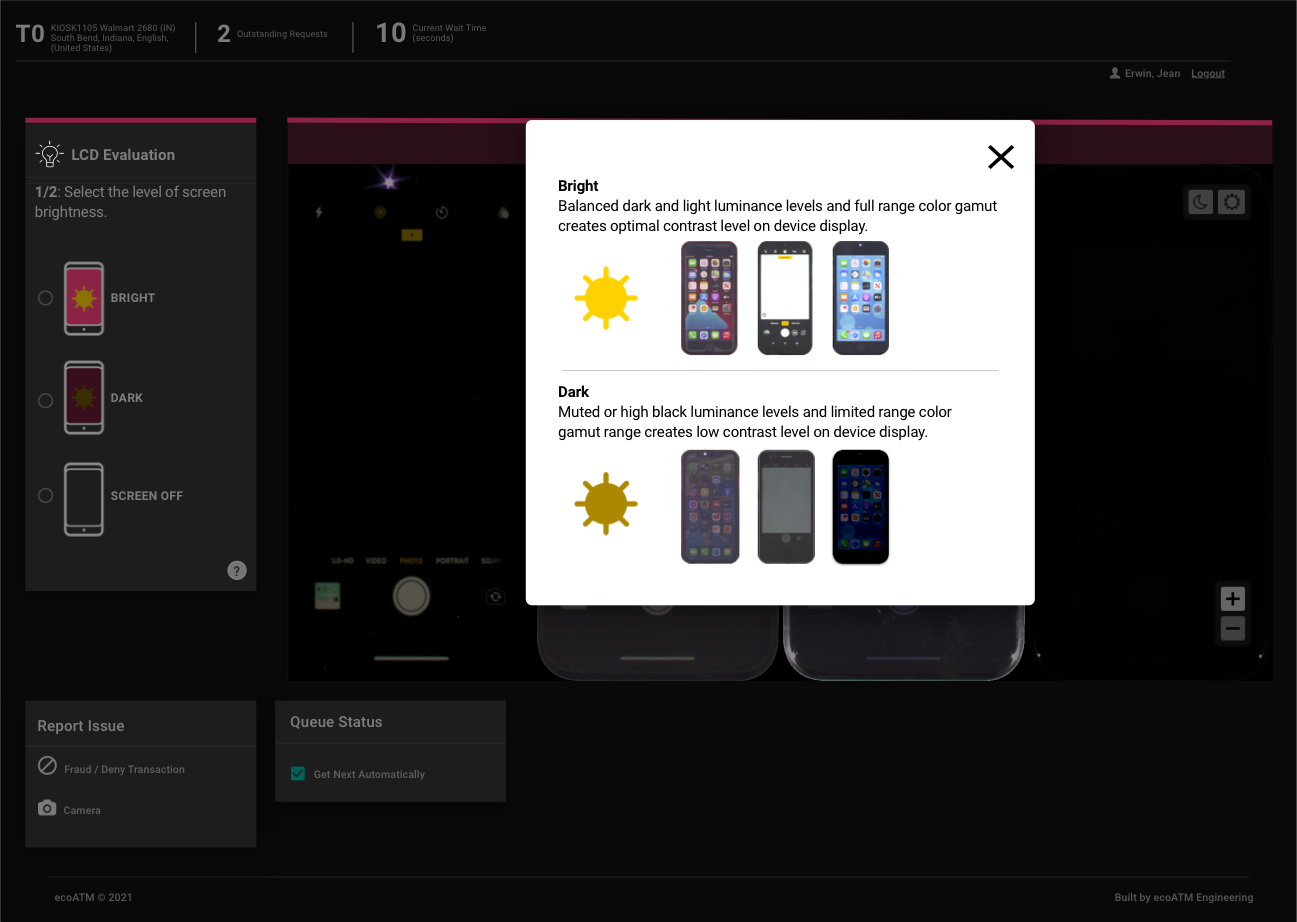
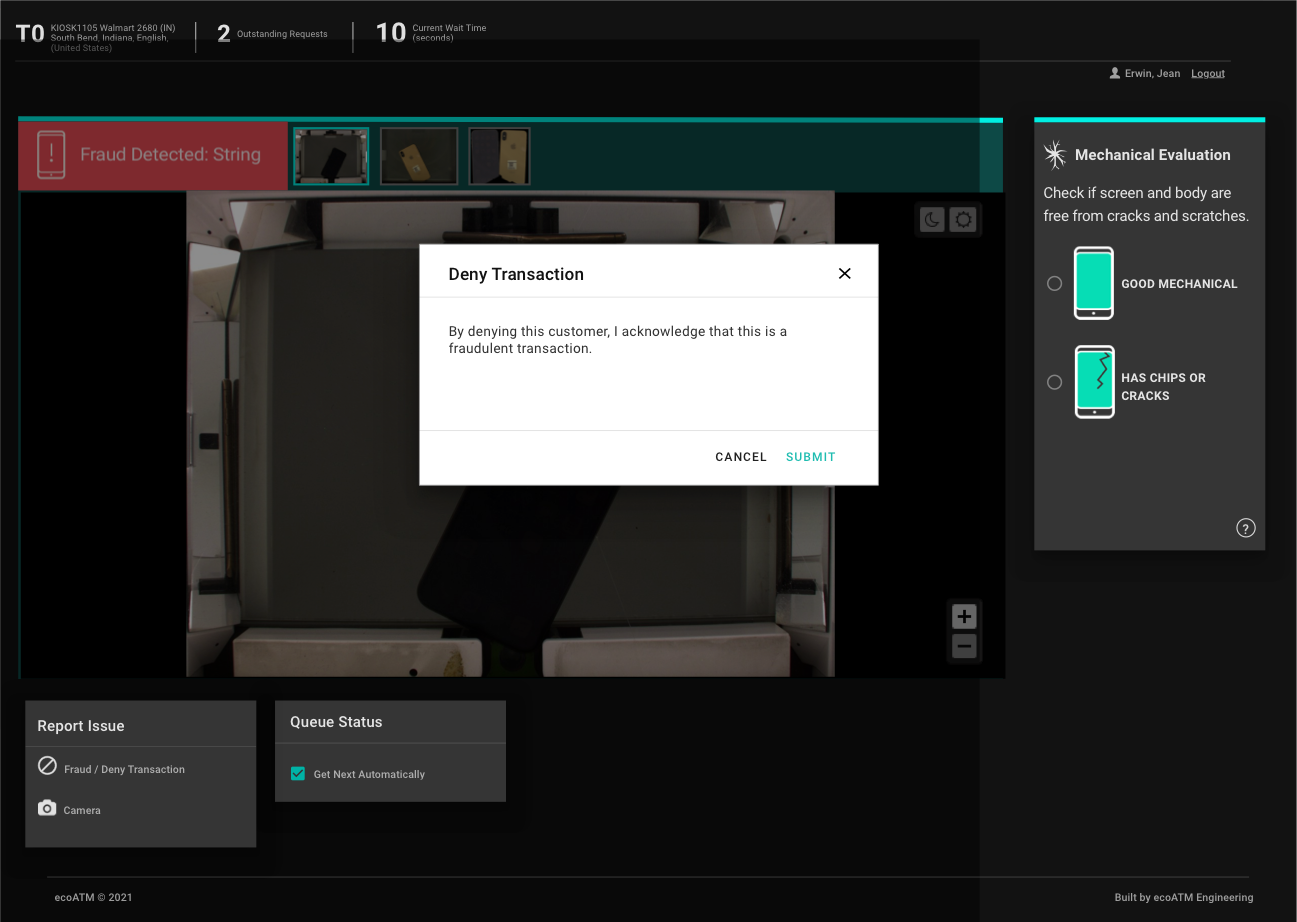
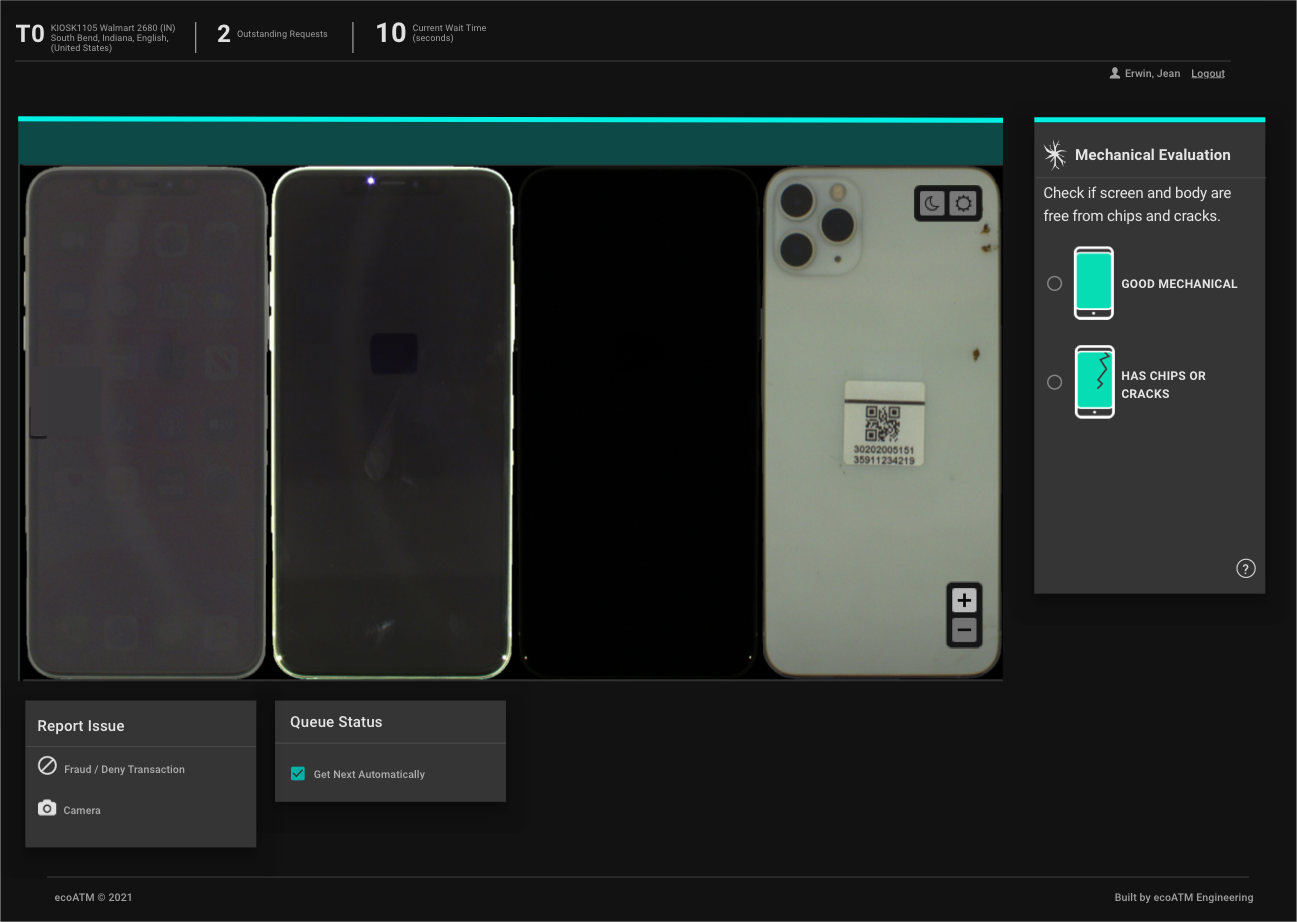
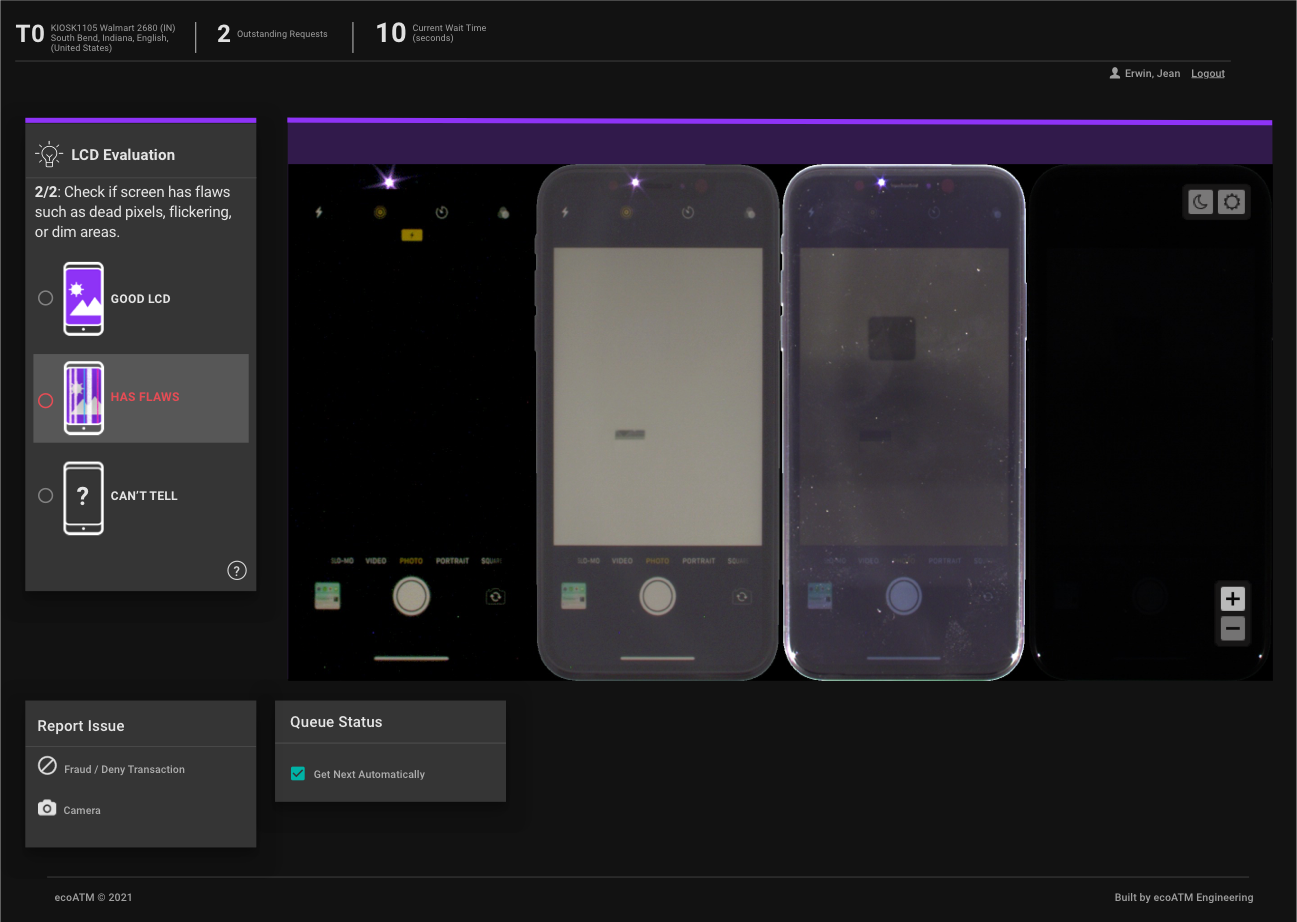
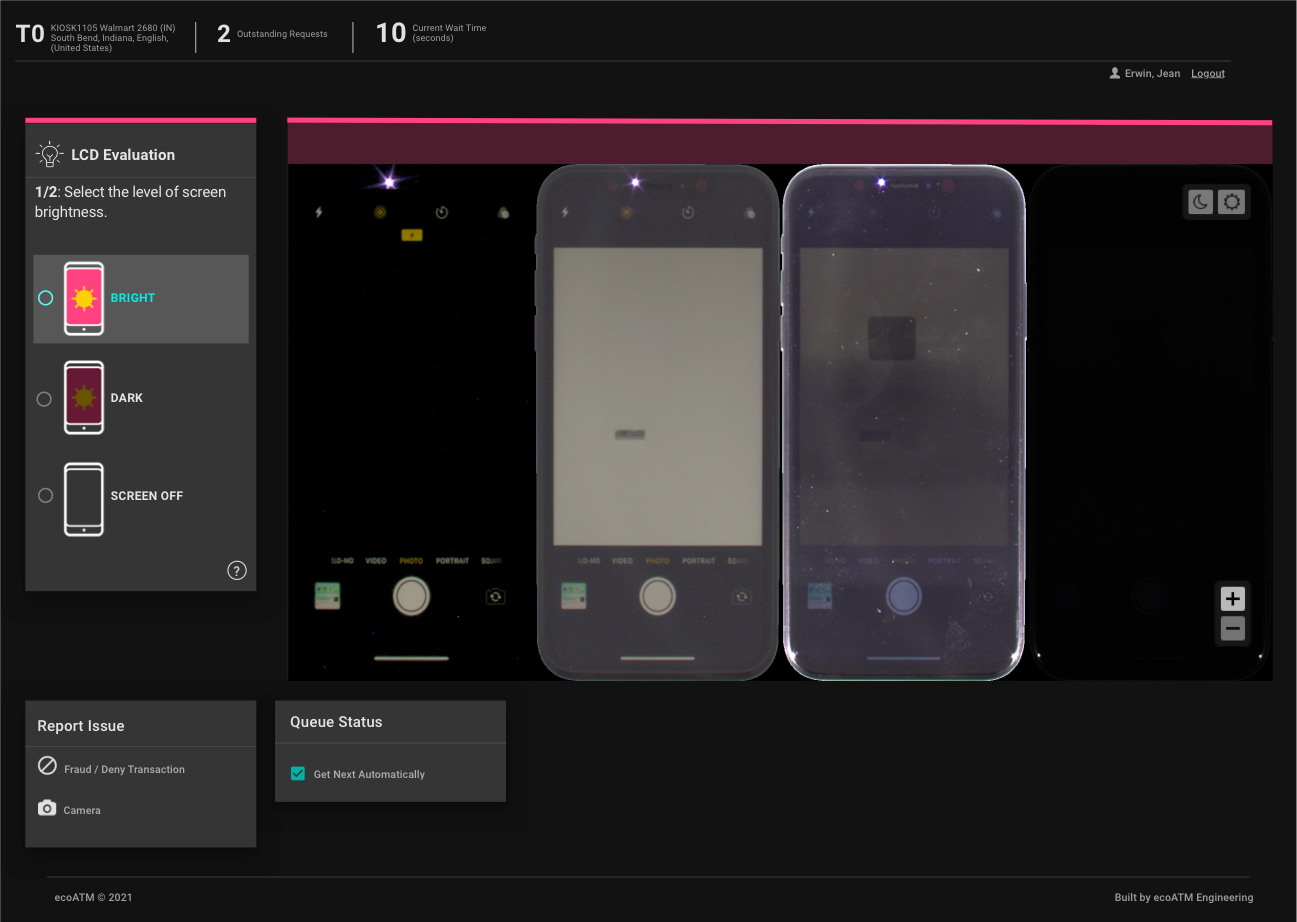
The changes made to the portal’s interface design allowed users to perform their job functions more quickly and effectively. After the UI redesign was released, device evaluation accuracy has since improved by 5.5%.
Some additions to the product feature set that allowed this marked improvement:
- The inclusion of banner-style alerts that provide instantly recognizable visual notifications for agents when there is a case of suspected fraud or suspicious activity.
- Color classification system that allows agents to immediately distinguish when they are evaluating a different attribute of a device.
- Information modals that provides examples of real-life device images and enhanced descriptions for what agents should be looking for when making grading determinations.
- Modern iconography set that establishes visual language and clearly represents features, functionality, and content.